Online Employee Attendance Monitoring System
Track attendance effortlessly with real-time insights into employee work hours. Ensure accuracy, streamline operations, and boost productivity with our advanced attendance monitoring solution.
Attendance Summary
Daily Insights
Delayed Check-In
Work Activity Log
Free Trial
No Credit Card Required
Exclusive Support
What is Trackpilots Employee Online Attendance?
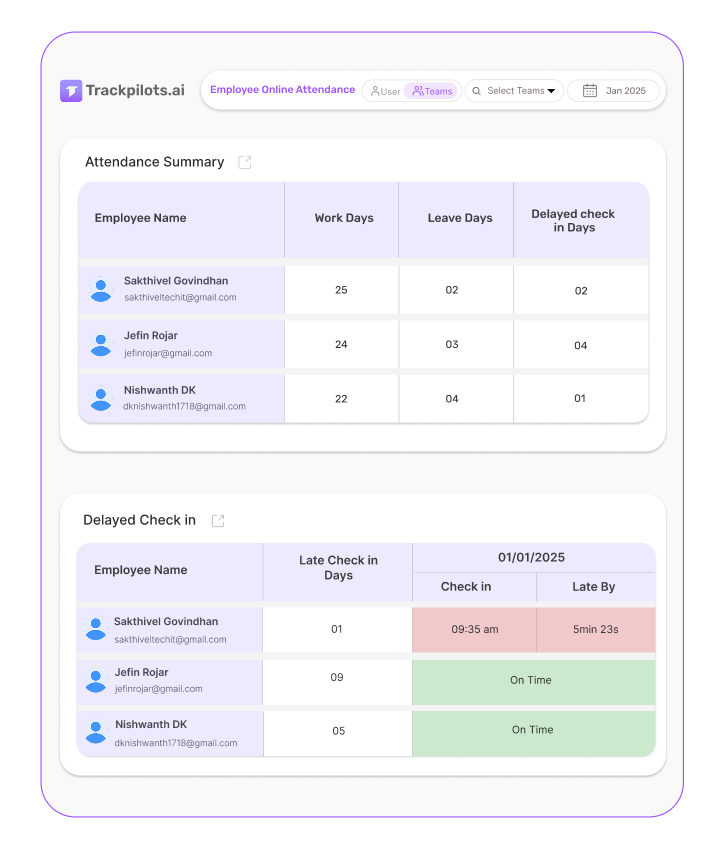
Trackpilots provides a smart attendance tracking system with Attendance Summary, Daily Insights, Delayed Check-In, and Work Activity Log to ensure accurate attendance records, boost efficiency, and streamline workforce management. Also available as a dedicated attendance tracking software page with full feature details.
Free 30 days trial
Exclusive Support
No Fees
All-in-One Employee Attendance Suite
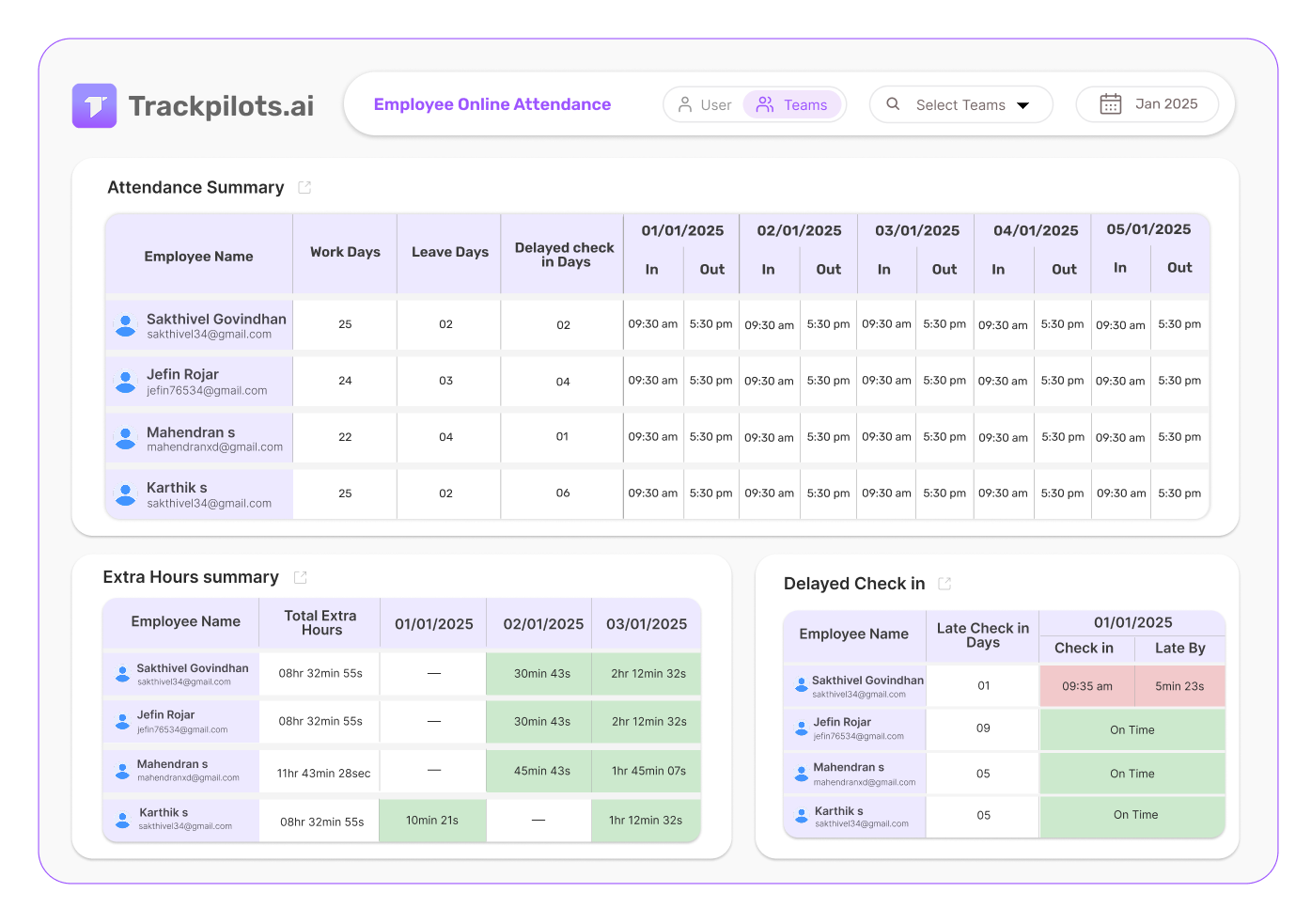
Trackpilots simplifies attendance tracking with real-time insights, automated logs, and precise monitoring to ensure accurate work records, reduce errors, and improve workforce efficiency effortlessly.
No Credit Card Required
Attendance Summary
Get a complete overview of employee attendance records.
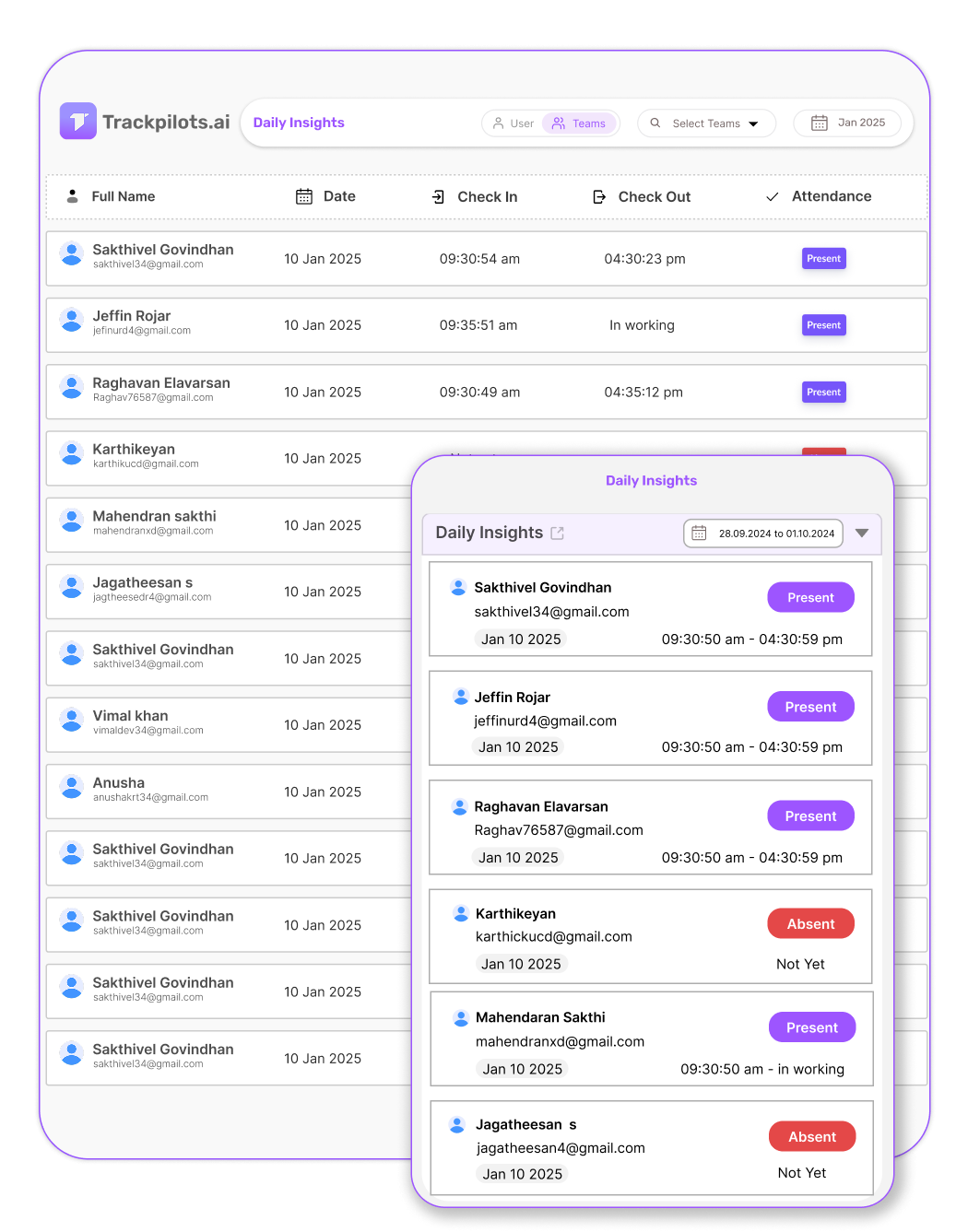
Daily Insights
Analyze daily attendance trends for better planning.
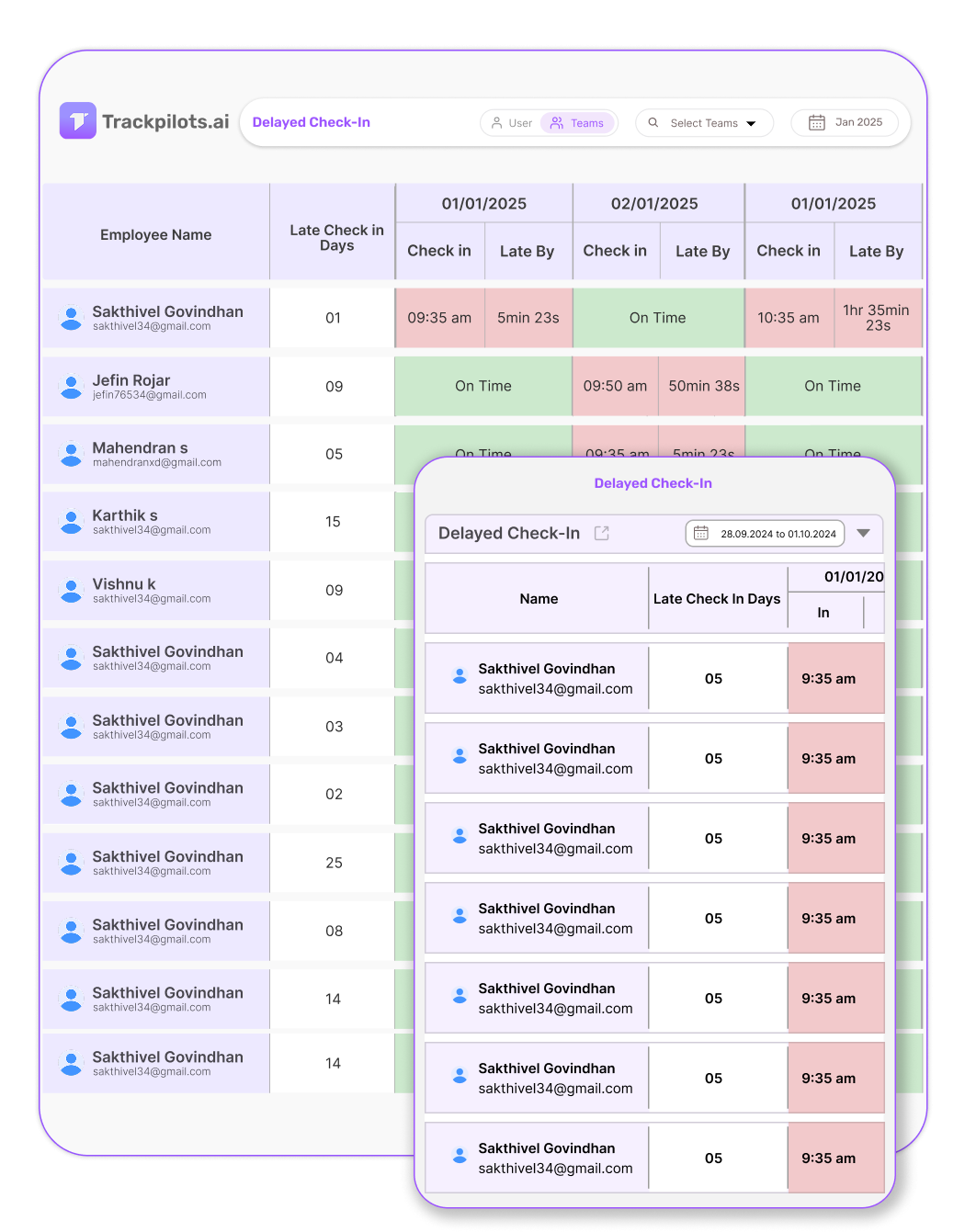
Delayed Check-In
Identify late arrivals and improve punctuality.
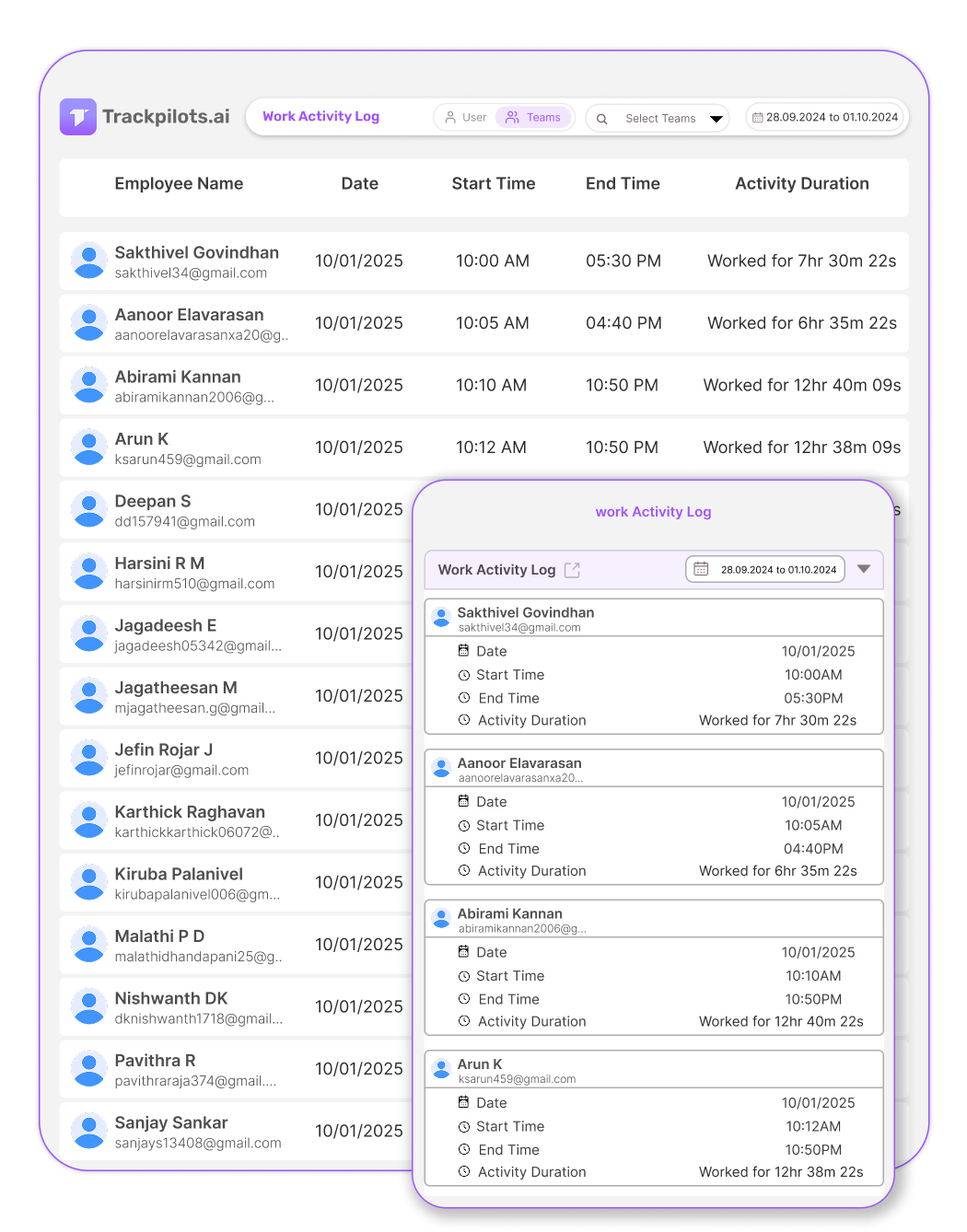
Work Activity Log
Monitor employee work hours and activity logs.
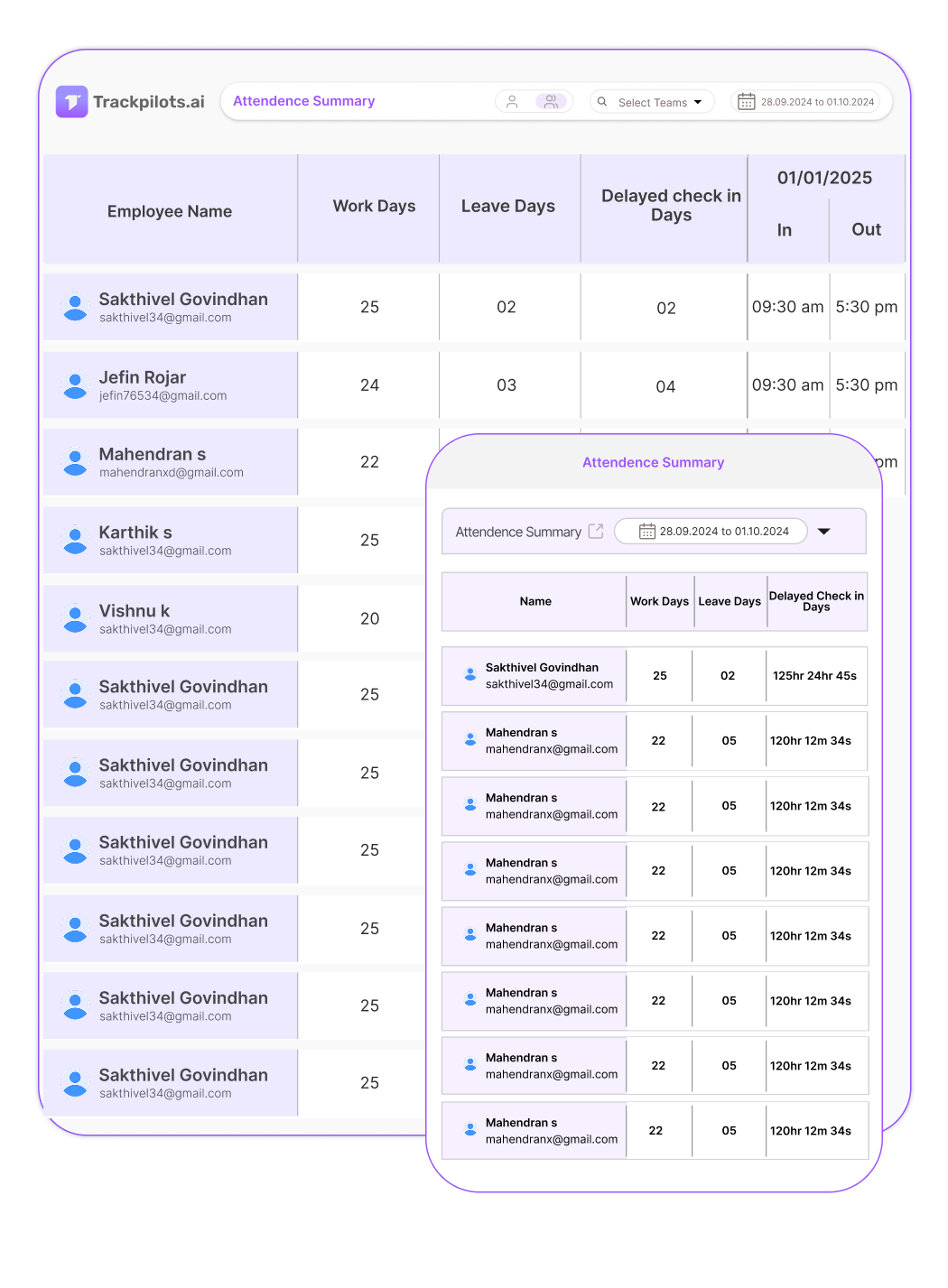
Get a complete overview of employee attendance records.
Attendance Summary provides a real-time view of employee attendance.
It helps businesses track work hours and detect absenteeism.
Managers can generate reports for payroll and compliance.
This feature ensures accurate record-keeping and workforce planning.
Analyze daily attendance trends for better planning.
Daily Insights track employee check-in and check-out times.
It provides data-driven reports to analyze work patterns.
Managers can optimize shifts and improve attendance consistency.
This feature enhances workforce productivity with actionable insights.
Identify late arrivals and improve punctuality.
Delayed Check-In notifies managers about late employee logins.
It helps identify trends in tardiness and attendance gaps.
Businesses can set policies to encourage on-time check-ins.
This feature ensures better time management and accountability.
Monitor employee work hours and activity logs.
Work Activity Log records login times and total work hours.
It provides detailed insights into employee availability.
Managers can track productive hours and break durations.
This feature helps maintain work discipline and efficiency.
Attendance Tracking vs Productivity Tracking — What's the Difference?
Many managers treat attendance and productivity as the same metric — they are not. Attendance tracking tells you when an employee is at work. Productivity tracking tells you what they accomplished during that time. As a complete online attendance management system, Trackpilots captures both in one platform so you never have to choose.
Traditional attendance systems — biometric punches, manual timesheets, or HR spreadsheets — only confirm presence. They cannot tell you whether those eight hours were spent on deep work or idle browsing. This gap is especially costly for companies managing distributed teams, where remote employee attendance tracking without a productivity layer gives a false sense of accountability.
Trackpilots bridges this gap automatically. The desktop agent logs the exact moment an employee's device becomes active (check-in) and goes idle (check-out), creating a verified attendance record without any manual input. Simultaneously, it captures application usage, active vs idle time, and automatic screenshots — giving managers a full productivity picture alongside the attendance log.
For businesses in India and Southeast Asia managing hybrid or remote workforces, having automatic attendance software India-based teams can rely on — one that runs silently in the background without disrupting workflow — is a significant operational advantage. You get payroll-ready attendance data and productivity insights from a single lightweight agent, with zero manual effort from employees or HR.
What is an Online Employee Attendance Monitoring System?
An online employee attendance monitoring system automatically tracks when employees start and stop work, replacing manual punch cards, timesheets, and paper registers. The system records login/logout times, work session duration, breaks, and absences in a digital dashboard accessible to HR and managers. Trackpilots' attendance system uses device login as the trigger for clock-in (first device activity = start of workday) and last activity as clock-out (logout or inactivity period = end of workday). This eliminates time theft from late arrivals, early departures, or buddy punching. Attendance data integrates with payroll, HR systems, and compliance reports. Unlike manual timesheets (prone to errors and dishonesty), online systems capture real, device-level evidence of work hours.
How Does Automatic Attendance Tracking Work?
Trackpilots' automatic attendance mechanism works in three stages. First, when an employee powers on their computer and logs in (or manually starts the Trackpilots agent), the system records the timestamp as clock-in. The agent runs continuously in the background, monitoring keyboard and mouse activity to detect active work. If an employee is inactive for 15 minutes (configurable), the system marks a break or idle period — but the work session continues. At day's end, when the employee logs out or closes their laptop, Trackpilots records the final activity timestamp as clock-out. All data is encrypted and stored in the secure cloud dashboard. Managers can view per-employee attendance summaries (total hours, late arrivals, early departures), generate payroll-ready reports, and set automated alerts for attendance anomalies. The system integrates with common payroll platforms (BambooHR, Zoho, ADP) to reduce manual data entry. For remote or hybrid teams, attendance data combined with productivity scores gives HR complete visibility into work patterns.
Set Up Attendance Tracking in 5 Minutes
Getting Trackpilots attendance running takes just 5 minutes. Here's the step-by-step process:
That's it. Your attendance system is live. Employees are being tracked in real time, and you have payroll-ready reports.
Frequently Asked Questions
How does automatic attendance work in Trackpilots?
Trackpilots' desktop agent silently monitors when an employee's device becomes active and marks that as the check-in time. When the device goes idle beyond a configurable threshold, it records the check-out. This creates a fully automatic attendance log — no manual punching, no HR intervention. As an automatic attendance software, Trackpilots eliminates buddy punching and time-sheet errors entirely.
Can employees mark attendance from home?
Yes. Remote employee attendance tracking is one of Trackpilots' core use cases. Employees working from home simply run the desktop agent on their Windows, Mac, or Linux machine. Attendance is recorded the moment they start working, and managers see real-time check-in status from the central dashboard — making it a reliable online attendance management system for distributed teams.
Does Trackpilots track attendance on mobile?
Trackpilots currently focuses on desktop platforms (Windows, Mac, Linux) where most knowledge-worker productivity happens. Mobile tracking is on the roadmap. For now, teams that need mobile attendance can combine Trackpilots' desktop monitoring with a separate mobile check-in tool, while using Trackpilots as the primary productivity and attendance record for laptop and desktop workers.
Multi-Platform Compatibility
Seamlessly track and monitor across Windows, Linux, and Mac for complete flexibility.


Still Need Help?
Drop us a line at team@trackpilots.com or hit us up in the chat at the bottom right corner, and we'll help you out.