Computer Activity Monitoring Software
Trackpilots is the best computer activity monitoring software for businesses in 2026. It tracks which apps employees use, which websites they visit, when they go idle, and calculates a real-time productivity score — all without recording a single keystroke.
Real-Time App & Website Tracking
Minute-by-Minute Activity Timeline
Idle Time Detection
No Keylogger — Privacy Respectful
Free Forever
Unlimited Users
No Keylogger
What Does Computer Activity Monitoring Software Do?
Computer activity monitoring software records how employees use their computers during work hours — which applications they open, which websites they visit, when they go idle, and how productive each session is. Unlike manual timesheets, it runs automatically in the background without interrupting work. Trackpilots makes this data available on a central dashboard so managers can monitor employee computer activity across their entire team at once.
Real-Time App Tracking — Which Apps Are Open, for How Long
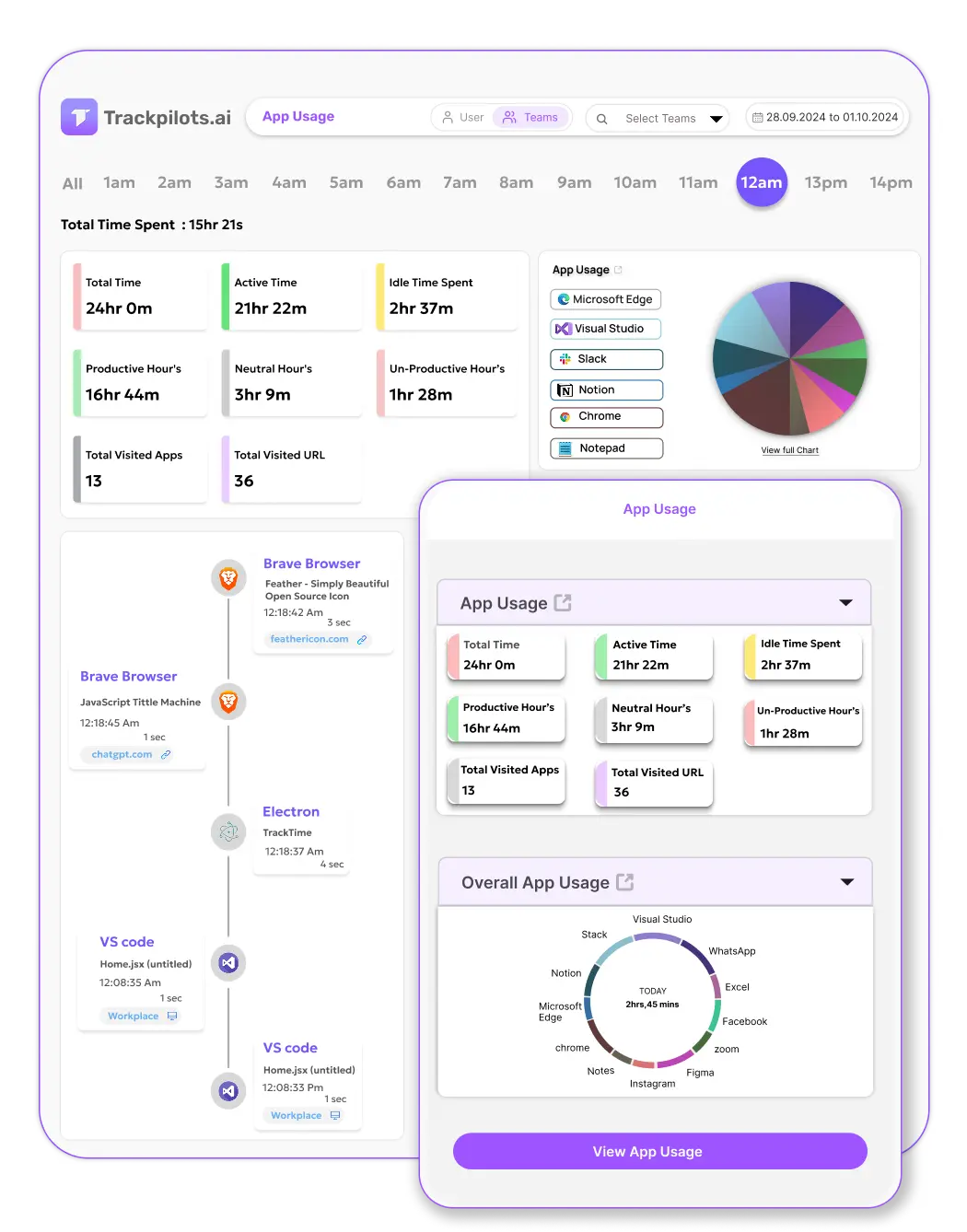
Trackpilots continuously monitors which application has focus on each employee's computer. Every time an employee switches from Excel to Chrome to Slack, the change is logged with a timestamp. At the end of the day, the dashboard shows a full breakdown of time spent per application — sorted by most used to least.
Each application is automatically assigned a productivity category: Productive, Unproductive, or Neutral. Tools like VS Code, Figma, Excel, and AutoCAD are pre-labelled as productive. Social media apps and entertainment sites are flagged as unproductive. Admins can customise labels per role — YouTube may be unproductive for a developer but productive for a content creator. This is the core of Trackpilots' employee computer monitoring: not just what is open, but whether it matters for work.
Website Monitoring — Full URL Tracking & Time-on-Site
Employee internet usage tracking in Trackpilots goes beyond "Chrome was open for 3 hours." It captures the domain and page title of every website visited in any browser — Chrome, Firefox, Edge, Safari, or Brave — and records how long each tab was in focus.
Managers can see at a glance which websites each employee visits most, how much time is spent on productive versus distracting sites, and whether there are patterns (e.g., heavy Reddit usage every Friday afternoon). Sites are categorised using the same productive/unproductive system as apps. The report is available per employee, per team, or aggregated across the whole company — giving you a clear view of employee internet usage without accessing private content or message history.
Activity Timeline — Minute-by-Minute Workday Breakdown
The activity timeline is one of Trackpilots' most powerful tools for understanding how a workday actually unfolds. For every employee, you can open a timeline view that shows each minute of their shift — which app was active, which website was open, and whether they were typing or idle.
This view makes it immediately obvious if an employee spent two hours on productive work, took an unlogged break, then returned for another stretch. It also reveals context that raw productivity scores miss: an employee with a 60% score who had a 3-hour deep work block followed by afternoon meetings is performing very differently from one who was intermittently active all day. Managers can use the timeline to monitor employee computer activity in the level of detail a situation requires — without reviewing screenshots unless they choose to.
Idle Time Detection — When Logged In but Not Active
Being logged in is not the same as working. Trackpilots detects idle periods automatically — if there is no keyboard or mouse activity for a configurable number of minutes, the system marks that period as idle and stops counting it toward productive hours.
Idle time is surfaced in both the daily productivity score and the activity timeline, so managers can distinguish between an employee who worked a focused 6-hour day and one who was logged in for 9 hours but idle for 3. For BPO floors, call centres, and remote teams where accountability is critical, idle detection gives supervisors the information they need without resorting to physical surveillance or constant manual check-ins.
How Trackpilots Differs from Keyloggers
Keyloggers record every character an employee types — passwords, personal messages, private communications. This creates serious legal, ethical, and security risks for employers. Trackpilots is not a keylogger and does not capture any typed content.
What Trackpilots does capture is activity metadata: which application is active, which website domain is open, and whether the keyboard or mouse is being used. It never records what is typed, what is said in video calls, or what is written in emails. This distinction is important for legal compliance in most jurisdictions — employee computer monitoring laws in India, the EU, and the US generally permit activity monitoring with notice but prohibit keystroke capture without explicit consent. Trackpilots is designed to give employers genuine visibility into how work time is spent, while staying on the right side of privacy expectations.
Monitor Your Team's Computer Activity — Free
Trackpilots gives you real-time app tracking, employee internet usage tracking, idle detection, and activity timelines for your entire team — completely free for unlimited users. No keylogger. No credit card. Setup in under 10 minutes.
Monitor your team's computer activity freeBook a DemoUnlimited Users
No Credit Card
No Keylogger
Free Forever
Still Need Help?
Drop us a line at team@trackpilots.com or hit us up in the chat at the bottom right corner, and we'll help you out.