Employee Screen Capture Software
Trackpilots is an automatic screenshot employee monitoring tool that silently captures employee screens at configurable intervals — every 1, 5, 10, or 20 minutes. Free for unlimited users. No credit card required.
How Automated Screenshot Capture Works
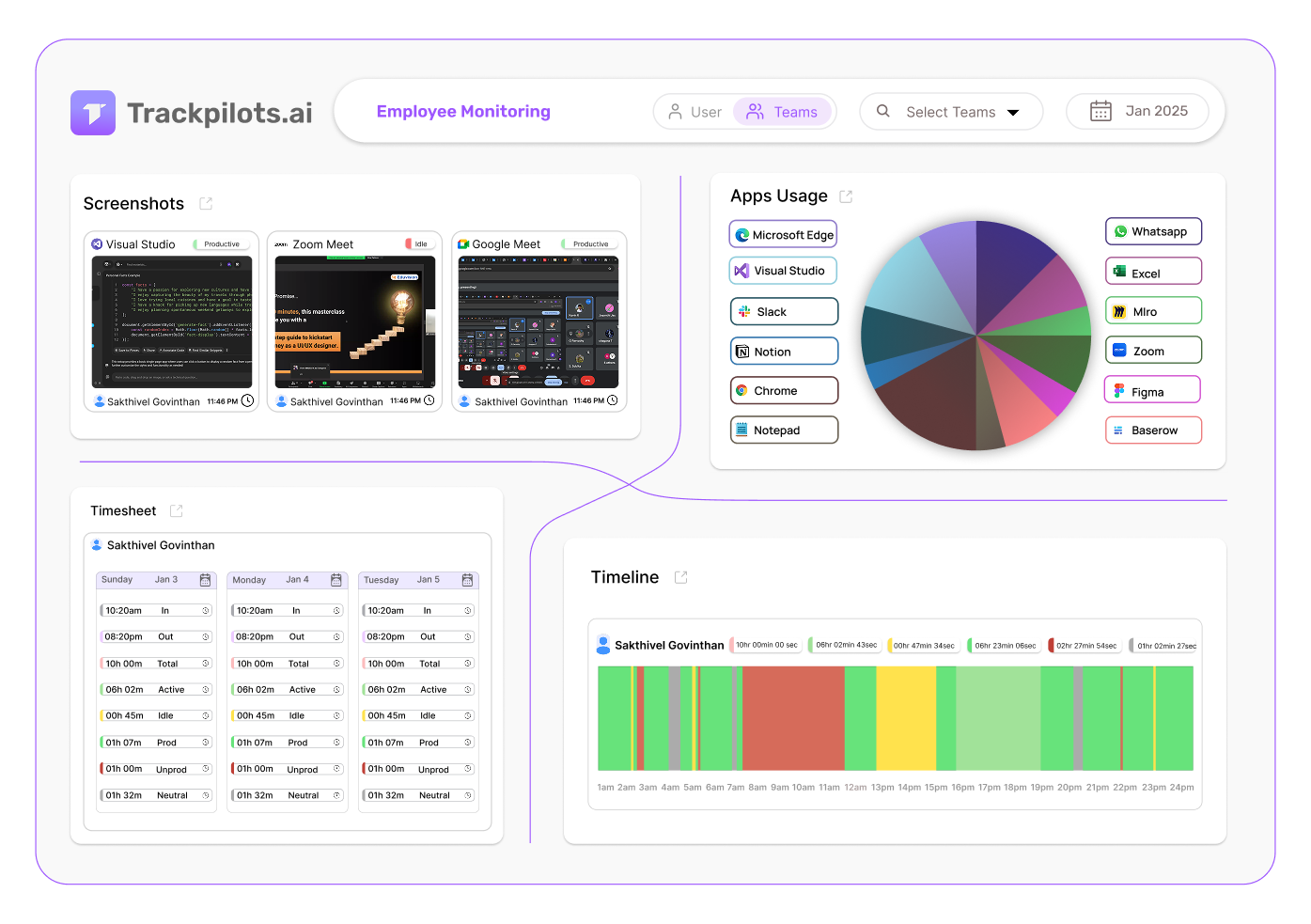
Once the Trackpilots desktop agent is installed, screenshot monitoring software begins working automatically — no configuration needed from employees. The agent runs silently in the background and captures the full screen at the interval you choose from the admin dashboard.
You can set capture intervals per team or per individual:
Every 1 minute
Starter Pack
Maximum visibility — ideal for BPOs and call centres
Every 5 minutes
Starter Pack
Balanced tracking for development and creative teams
Every 10 minutes
Starter Pack
Light oversight for trusted remote employees
Every 20 minutes
Free Plan
Available on the free plan — unlimited users, no cost
Every screenshot is timestamped, tagged to the active user, and uploaded securely to the Trackpilots cloud. Managers can access them instantly from any browser — making Trackpilots a reliable proof of work screenshot tool that works across time zones and locations.
Built-In Privacy Controls — Capture What Matters, Protect What Doesn't
Responsible employee screen capture software gives managers visibility without exposing employee passwords, personal information, or sensitive client data. Trackpilots includes two key privacy controls:
Blur Sensitive Data
Enable automatic blurring on screenshots that contain password fields, banking interfaces, or any screen content you designate as sensitive. The screenshot is still captured and timestamped — but the blurred region ensures private data is never exposed to managers or stored in plain form.
Exclude Specific Apps
Designate apps that should never be captured — personal email clients, medical portals, HR systems, or any application outside the scope of work monitoring. Trackpilots will pause screenshot capture automatically when those apps are in focus and resume when the employee switches back to a work application.
The Proof of Work Gallery — Review Screenshots at a Glance
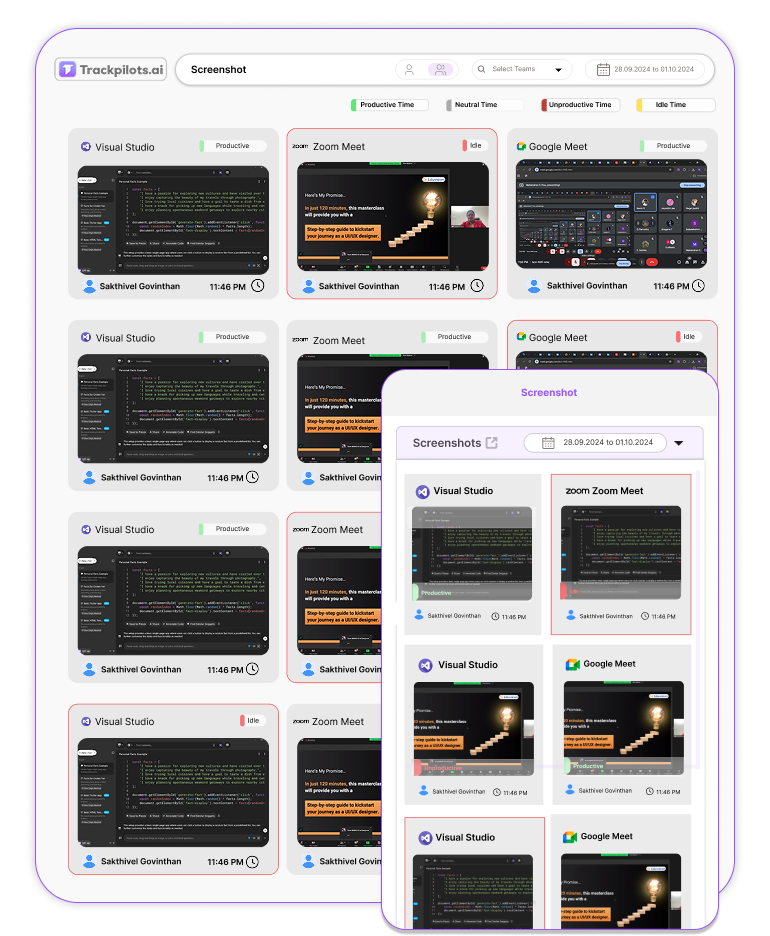
The Trackpilots proof of work screenshot tool organises every captured image into a visual timeline gallery per employee. Managers can scroll through an entire day's worth of screenshots in under two minutes.
Filter by employee, team, or date range to jump straight to the period you need to review.
Click any screenshot to expand it — see the full resolution image with app name, timestamp, and active window title.
Flag screenshots to mark unusual activity or save for client billing evidence.
Download or share individual screenshots or full-day exports directly from the dashboard.
Stealth Screenshot Mode — Invisible, Silent, Always On
When stealth mode is enabled, the Trackpilots agent runs completely invisibly. There is no system tray icon, no notification, and no visible process in the task manager that employees would recognise as monitoring software. Screenshot monitoring software in stealth mode captures screens at the configured interval without any indication to the employee that a capture just occurred.
This makes Trackpilots the most unobtrusive employee screen capture software available. Employees work naturally — without the self-consciousness that comes from knowing a screenshot is imminent. The result is a more accurate picture of real working behaviour rather than performance-for-the-camera.
Stealth mode is available on the Starter Pack ($3.99/user/month) and can be toggled per employee or applied across an entire team. Organisations are responsible for complying with local labour laws regarding disclosure of monitoring to employees.
Who Uses Trackpilots Screenshot Monitoring Software
Remote Teams
For fully remote organisations, automatic screenshot employee monitoring closes the visibility gap between managers and distributed employees. Instead of relying on self-reported timesheets or video check-ins, managers get a continuous, objective record of what every remote employee worked on throughout the day. This is especially valuable for asynchronous teams working across multiple time zones.
BPO & Call Centres
BPO operations and call centres use 1-minute screenshot intervals to verify that agents are logged into the correct systems, following scripts, and not accessing unauthorised applications during customer interactions. The proof-of-work gallery allows QA managers to audit activity without requiring physical presence on the floor.
Freelancer Management
Agencies and project managers who work with freelancers use Trackpilots as a proof of work screenshot tool to verify billed hours. Freelancers install the desktop agent during billable sessions — screenshots are captured automatically and shared with the client as part of the invoice. This removes billing disputes and builds trust between clients and contractors.
Start Capturing Employee Screenshots — Free
Trackpilots is free for unlimited users. The free plan includes screenshots every 20 minutes, attendance tracking, and productivity analytics. Upgrade to Starter Pack at $3.99/user/month for 1-minute intervals, stealth mode, and 1-year data retention.
Multi-Platform Compatibility
Seamlessly track and monitor across Windows, Linux, and Mac for complete flexibility.

Still Need Help?
Drop us a line at team@trackpilots.com or hit us up in the chat at the bottom right corner, and we'll help you out.