Employee Tracking Software
Monitor what your team works on — in real time. Trackpilots employee tracking software gives you full visibility into activity, time, and productivity across remote, hybrid, and in-office teams.
Real-Time Activity Tracking
Automatic Screenshots Every Minute
App & Website Monitoring
Automatic Attendance Tracking
Free Trial
Unlimited Users
No Credit Card Required
What is Employee Tracking Software?
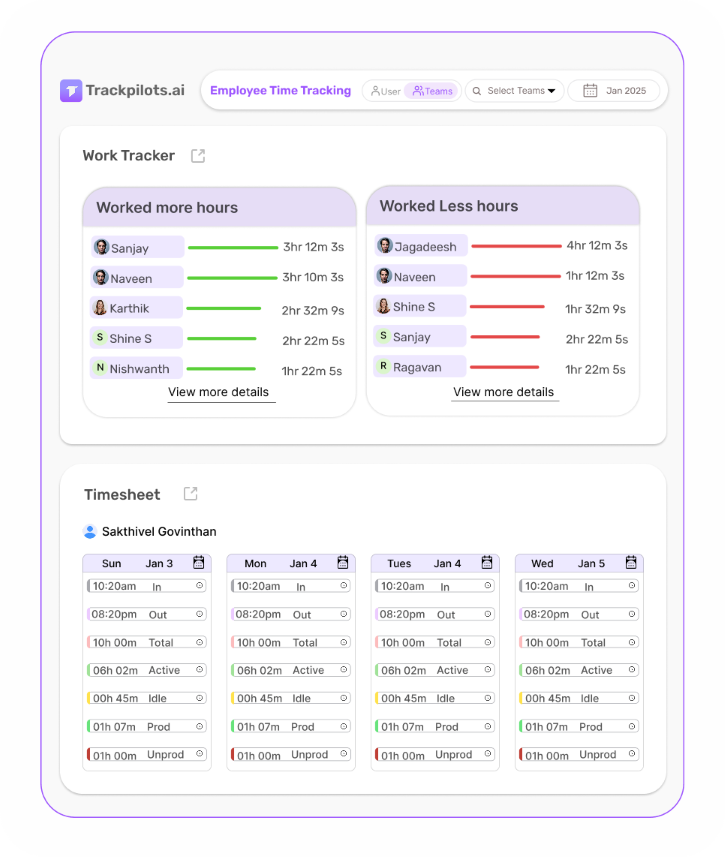
Employee tracking software records what your team does on their computers during work hours — which apps they open, which websites they visit, how many hours they work, and how productive each session is. Unlike manual timesheets or self-reported logs, an employee work tracker collects data automatically in the background, giving managers an accurate, objective picture of workforce activity without interrupting anyone's workflow.
Trackpilots is built for businesses that need reliable employee monitoring and tracking across remote, hybrid, and in-office setups. It installs on Windows, macOS, and Linux, works silently in the background, and syncs all data to a central dashboard where managers can view reports by employee, team, or date range — without any manual data entry.
6 Core Features of Trackpilots Employee Tracking Software
Everything you need to track employee activity, measure output, and manage your team — in one platform.
Time Tracking
Trackpilots automatically records when each employee starts and stops working — no timers to start, no manual entries to fill. Work hours are calculated from real computer activity, so the data is always accurate. Export timesheets by employee or team for payroll, client billing, or compliance — in one click. Unlike traditional time tracking tools, Trackpilots captures idle time separately so you see actual productive hours, not just logged-in hours.
Automatic Screenshots
Trackpilots captures screenshots of each employee's active screen at set intervals — every 1 minute on the Starter Pack, or every 20 minutes on the free plan. Screenshots are stored securely in the cloud and accessible only to authorised managers. They serve as proof of work for remote teams, freelancers, and client-billed projects. Sensitive data can be blurred automatically to protect employee privacy while still verifying activity.
App & Website Monitoring
Every application opened and every website visited is logged with the time spent. Managers can see at a glance whether employees are using work tools or browsing social media, streaming platforms, or unrelated websites. Apps and sites are automatically categorised as productive or unproductive based on the employee's role, so productivity scores reflect actual work — not just time at the keyboard. This is one of the most-used features by managers who want to track employee activity without micromanaging.
Attendance Tracking
Trackpilots records check-in and check-out times automatically based on computer activity — no punch-in required. Late arrivals, early departures, and absences are flagged automatically in the attendance dashboard. For remote teams distributed across time zones, attendance data is always timestamped accurately regardless of location. Attendance reports can be filtered by employee, team, or date range and exported for HR or payroll processing.
Stealth Monitoring Mode
For businesses that need unobtrusive monitoring, Trackpilots offers a silent tracking mode — the agent runs entirely in the background with no visible icon, no system tray entry, and no notifications to employees. This ensures employees behave naturally and work data reflects real patterns rather than performed productivity. Stealth mode is available on the Starter Pack and is fully compliant with employer monitoring laws when disclosed in an employment agreement. See stealth employee monitoring software for full details.
Productivity Score
Every employee gets a daily productivity score calculated from their app usage, active time, idle time, and break patterns — not from keystrokes or mouse clicks. Scores are benchmarked against the team average so managers can identify high performers and those who need support. The productivity timeline view breaks each workday into productive, idle, and break segments so patterns are immediately visible. Trackpilots does not log keystrokes or capture personal data beyond work activity.
Who Needs Employee Tracking Software?
Employee monitoring and tracking is no longer just for large enterprises. Any business with salaried or hourly staff — remote, hybrid, or in-office — benefits from objective activity data.
Remote & Hybrid Teams
When managers cannot see their team in person, an employee work tracker closes the visibility gap. Know who is online, what they are working on, and whether productivity is consistent — without scheduling check-in calls every hour.
Agencies & Client Services
Track billable hours per client project with automatic time logs. Screenshots provide proof of work that can be shared with clients. No more estimating hours at the end of the week — every minute is recorded automatically.
BPO & Call Centres
Monitor agent activity, break compliance, and application usage across large floors. Idle time alerts notify managers the moment an agent goes inactive beyond the allowed threshold. Shift attendance is tracked automatically.
IT & Software Teams
Track developer and QA productivity by project or sprint. Identify which tools the team actually uses and whether time is being spent on the right tasks. App-usage data integrates naturally into sprint reviews and performance discussions.
How to Get Started with Trackpilots
Set up your entire team on employee tracking software in under 10 minutes — no IT department required.
1. Create a Free Account
Sign up at trackpilots.com/sign-up — free for unlimited users, no credit card required. Your dashboard is ready immediately.
2. Install the Agent
Download the Trackpilots agent for Windows, macOS, or Linux. Installation takes under two minutes. The agent starts tracking automatically on the next login — no configuration needed from employees.
3. View Your Dashboard
Log into your manager dashboard to see real-time activity, productivity scores, screenshots, and attendance — for every employee, from any device. Compare plans on the pricing page to unlock stealth mode and 1-minute screenshots.
Trackpilots employee tracking software is trusted by 500+ teams across India, the US, the UAE, and 30+ countries. Free for unlimited users — upgrade only when you need more.
Start Free TrackingView PricingStill Need Help?
Drop us a line at team@trackpilots.com or hit us up in the chat at the bottom right corner, and we'll help you out.